
Winter round up 2025/26
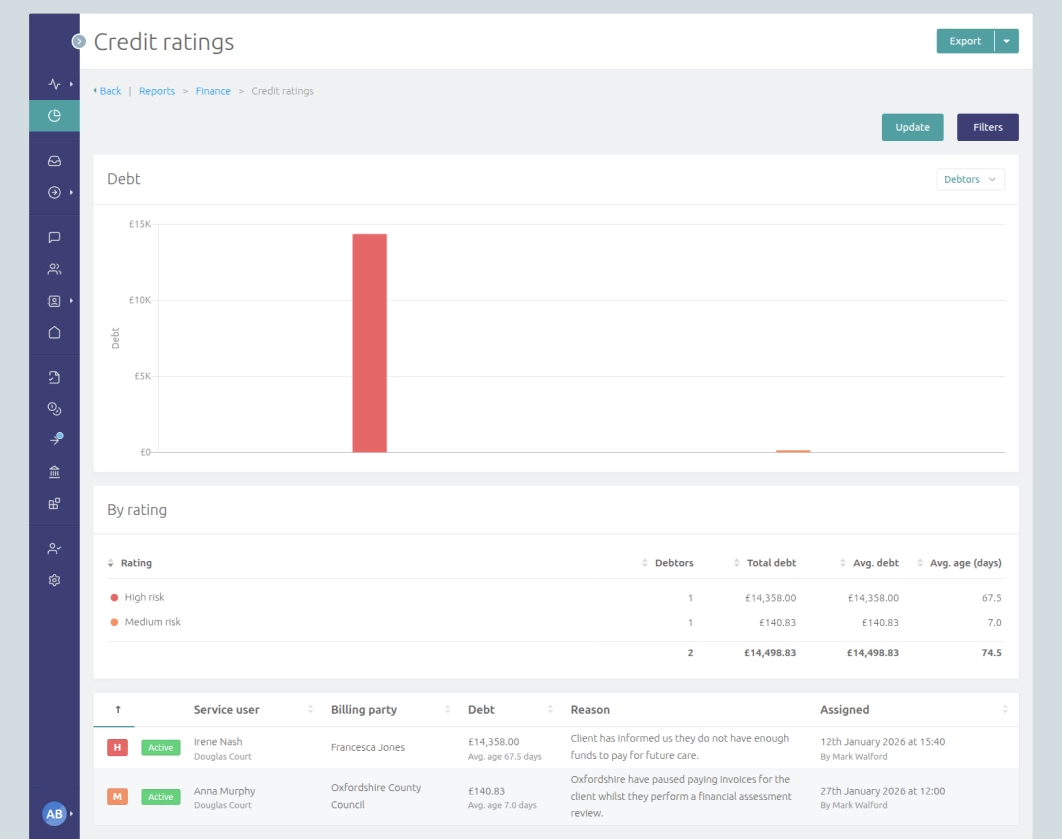
Over the Christmas and New Year period, we launched our new Credit Control Suite, giving clients greater visibility and control over their debt profile, alongside a range of additional improvements and new features driven directly by user feedback.
Credit control
Over the last few months we've introduced a suite of credit control tools to CareHQ including a new credit rating system, the introduction of invoice reminder schedules and numerous improvements to the existing debt reporting functionality.
If you are using CareHQ for receipts (or are considering doing so) and would like a guided tour of the new credit control functionality please contact support.
Credit control ratings
Within CareHQ you can now define your own set of credit ratings. Whilst it's common to use RAG ratings (e.g. red, amber, green) to represent risk (e.g. high, medium and low), often these categories are too broad for credit control departments and so we allow clients to define up to 10 credit ratings.
Once configured, each billing party can be assigned a credit rating, giving your team a clear visual indicator of their current credit status. Where a billing party funds multiple service users, for example a local authority, the credit rating applies to the service user and billing party specifically, not the billing party overall.
Ratings can be updated as part of your credit control process and adjusted as circumstances change, ensuring the system always reflects the most up-to-date view of risk across your debtor profile.
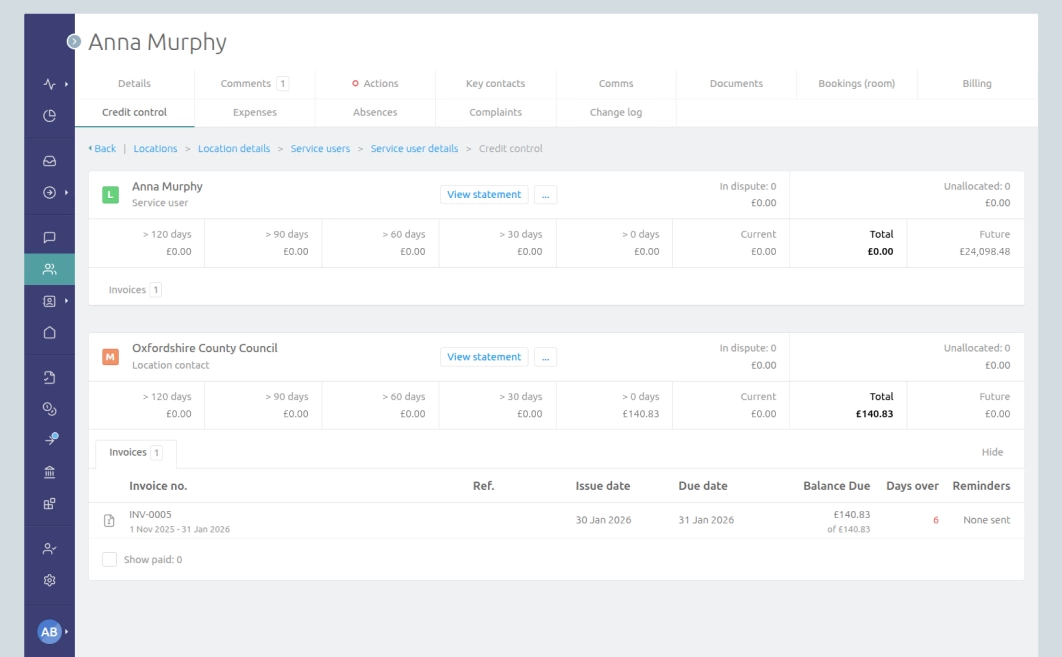
Credit ratings can also support internal workflows and decision making, helping teams prioritise collection activities and highlighting accounts that require closer attention. By supporting more granular ratings than transitional RAG categories, CareHQ helps you to segment accounts more effectively. For example, many clients define a "Legal" rating to clearly indicate when a debt should move from the collections team into a formal legal process.
This flexible approach means CareHQ can adapt to the way your organisation already manages credit risk. Whether you have a simple rating system or a more detailed model with multiple levels of risk, CareHQ provides a consistent, configurable framework that improves visibility and supports better credit control.
Invoice reminder schedules
CareHQ can now automatically generate and send reminders for invoices by email and post (*).
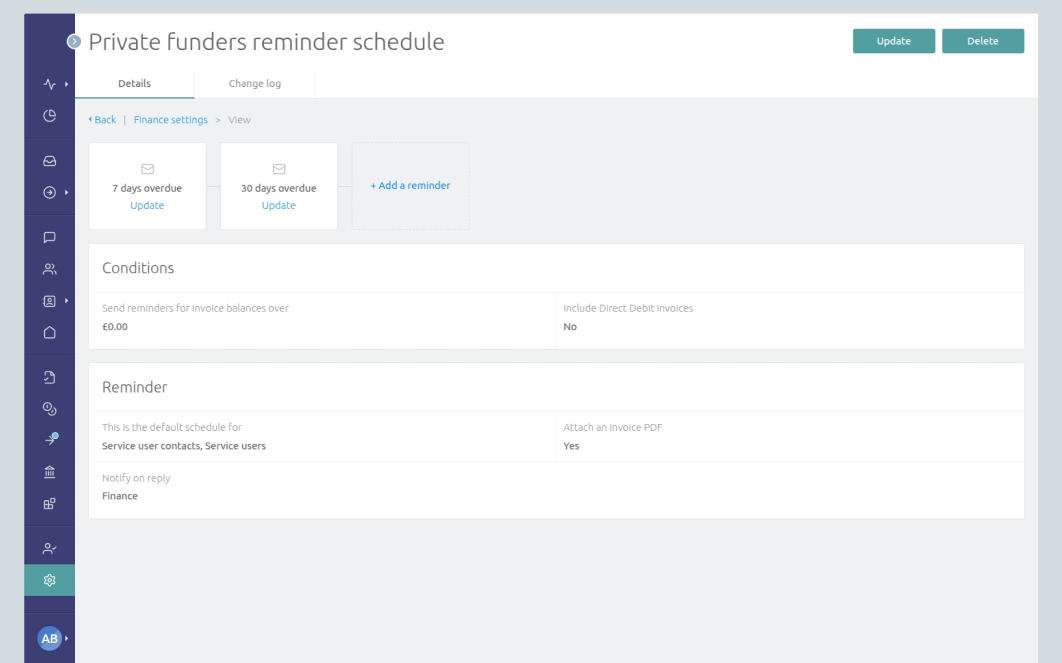
You can create up to 5 separate reminders per schedule based on the number of days an invoice is outstanding or overdue. Each reminder can be configured to send a tailored message relevant to the debt's age and you can choose to notify relevant parties whenever a specific reminder is sent (for example on a final notice email).
CareHQ supports multiple schedules so that you can tailor your reminders to specific billing parties (e.g. private funders vs local authorities). You can also choose to exclude Direct Debit invoices from collection notices and to set a minimum balance to send reminders for.
When a reminder is sent this is recorded against the invoice, allowing users to see how many reminders have been sent for an invoice within the credit control page for a service user as well as against an individual.
Documentation on configuring invoice reminders schedules is available here.
* Reminders to be sent by post are generated as PDFs and then emailed to the relevant party to be posted, often the finance department or an external printing and logistics partner.
Direct Debit collection run previews
The way Direct Debit collections are generated has been improved based on feedback from users.
We now provide a preview of all collections, which can be filtered to show collections for a specific company and / or location. It's also now possible to select a subset of collections to generate, while the ability to generate all collections in one go is still available.
When generating collections the process now allows users to override the processing date if required; this can be especially useful if a submission date has been missed. The new preview option also flags potential discrepancies, just as the Discrepancies tab does, but in this case it's for collections that have not yet been generated.
Pause billing contracts
It's now possible to pause and resume billing contracts. This can help ensure accurate reporting of accrued fees for contracts where payment is being delayed, for example whilst a property is sold.
Paused contracts are highlighted when using the invoice run so that they are not forgotten, and a new dedicated Paused billing contracts report has been added which provides details of all paused contracts as well as figures for the amount of fees accrued by those contracts.
Documentation on pausing and resuming billing contracts is available here.
Other updates & fixes
- It's now possible to import room data using the import engine. This helps speed up the process of onboarding and setting up new locations.
- A JavaScript SDK has been released for the CareHQ API. We now provide SDKs for Python, JavaScript, PHP, Ruby and C#.
- API read endpoints have been added for bank accounts, cash books, companies and receipts.
- New documentation available:
- Actions can now be sorted by created date as well as their default order (which is dependant on the page you are viewing them on, for example by default the My actions page will order by due date). To sort by created date users can open the filters when viewing an actions dashboard and use the Sort by field to change the order.
- When a care enquiry is added to CareHQ it's now possible to set up a notification for relevant users or notification groups. For individual users the option can be found in Update my profile under preferences. This can be especially useful for notifying users when care enquiries are added by third parties such as Autumna, Carehome.co.uk, TrustedCare.co.uk or API integrations (such as a website enquiry form).
- The automatic completion of home visits an hour after the visit time can now be disabled. This requires users to manually complete the action but provides an opportunity for the user to add additional comments regarding the visit when marking it as complete. If you prefer this approach please contact support and they can update your account.
- When configuring required document rules, users can now specify whether a document is required if they have or do not have dementia.
- Documents can now be archived which means by default they are hidden when reviewing the documents against a service user or location contact. Further, documents that expire are now automatically moved to the archived status.
- When marking a Direct Debit collection as returned we now automatically add a credit control comment detailing the return.
- A new credit allocations tab has been added under Invoices that allows users to view a list, search for, and export credit allocations.
- A new Home visits tab has been added under Care enquiries to allow users to list, search for, and export all home visits.
- A new Assessments tab has been added under Care enquiries to allow users to list, search for, and export all assessments.
- Direct Debit setups can now be restricted to specific locations making it simpler to correctly select the relevant setup when adding a Direct Debit mandate for a service user or key contact.
- A statement reference for a billing party can now be configured (under Setup/Manage billing). This reference will then appear on statement pages, PDF exports and in the filename of statement exports to CSV and MS Excel.
- The default identifier template for service users can now be configured for an account. Previously the default was fixed as the service user's name and reference and this had to be overridden on a per billing party basis. However, now a default can be defined for all billing parties, for example many providers prefer just to show the service user's full name or initials followed by an account code.
- We now record which user performed a reconcile, credit allocation, refund or write-off separately from the change log (this information is still held in the change log). This information is then included in listings and exports for the relevant financial transactions, making it simpler to identify which user performed a transaction.
- When discharging a service user as deceased, users are now prompted to specify if the service user was receiving end of life care prior to their passing. This helps keep reporting on unexpected deaths more accurate as users may forget to update a service user's record to indicate that they are receiving end of life care prior to discharging them.
- It is now possible to set a negative balance for low balance alerts.
- The order of rooms within CareHQ can now be manually set. Previously rooms were always ordered by name which worked for rooms with numbers (though it required zero prefixes, e.g. 01, 02, 03...) but was not suitable for locations where rooms are named and not numbered.
- When viewing a list of bookings users can now filter by location group.
- When viewing a list of receipts users can now filter by location group.
- When viewing a list of invoices users can now sort the list using the To column.
- When viewing a list of invoices users can now filter by contribution type.
- Inspectorate (CQC, CIW, CI(S)) provider and location Ids can now be set against a location.
- It is now possible to filter inbox messages to show only read or unread messages.
- Account owners are now able to mark all send errors as resolved.
- The Acquisitions report now has a sales channel filter.
- When viewing a tracked fund, the maximum period we provide an estimate for depletion over has been extended from 12 months to 5 years.
- Under Update my profile > Preferences, users can select to only see billing enabled location contacts by default. This can be especially helpful for billing teams who rarely have a need to view location contacts who are not being billed.
- Performance of the aged debt reports when viewing a snapshot has now been significantly improved (~5 x faster).
- A Last check-in column has been added to the Non-Direct Debit report.
- Last check-in, Funding type and Type of care columns have been added to the missing documents report.
- An invoice type icon has been added to the icon column in the reconciled receipts view to make it easier to identify the types of invoice reconciled. This is especially useful if the default invoice number prefixes (e.g. INV-XXXX, and CR-XXXX) are not being used.
- When adding a receipt the default behaviour has been changed to return the user to the view / reconcile receipt page for the receipt just added; previously users were returned to the receipts listing page. The shortcut to save and add a new receipt is unchanged.
- When sending an email via a location with no associated literature (e.g. a brochure) we now show a message indicating that there are no literature items that can be attached and linking to the literature listing for the locations.
- Invoice line item descriptions now generate with "per night"when the billing ruleset is set to bill per night, previously line item descriptions always used "per day".
- Resolved an issue where receipts marked as invalid would trigger a warning of a potential discrepancy when reviewing Direct Debit collections versus outstanding balances.
- When transferring a care enquiry to another location, comments that are transferred over are now assigned their original created (posted) date/time and correctly appear in their original order. Previously comments would be assigned the date/time of the transfer.
- Direct Debit collections can no longer be raised on the processing date for transactions, the latest date allowed has been corrected to the submission date.
- Reconciled Direct Debit collections can no longer be recorded as returned (forcing the receipt to show as a return) if the reconciled receipt cannot be unreconciled. For example if the receipt has been reconciled against an overpayment which has since been allocated to another invoice or returned.
- The billing review report now correctly handles partial months rate calculations at the start of a fixed month contract. Previously the report would use the full month rate for the start of the contract leading to discrepancies being reported in the rate billed on review.
- The TV ARC report now correctly flags over 75 respite residents as respite. Previously it would flag the resident as over 75 but not as respite.
- The last check-in and checkout date for service users is now updated daily. Before this change the last check-in/out dates where only a resident was checked in or retrospectively checked out meant future check-in/checkouts planned in advance were not being accounted for when setting these values.
- Invoices that relate to multiple service users (where there are multiple line items relating to 2 or more different service users) are now handled correctly in the Aged debt by service user report. Previously consolidated invoices would cause the report to return a 500 error.
- When generating a credit note or invoice by adjusting a linked contract the line item descriptions now correctly indicates "X days" o r "X nights". Previously the description would state "X Nones".
- When importing Direct Debit mandates en masse we now validate that the billing party does not have an existing active or pending mandate in place. Previously it was possible to accidentally create multiple active mandates against a billing party via the import process.
- The extend respite helper now correctly handles overlapping check-in/out days. Previously if the booking being extended started on the date of another booking then the option to extend the contract automatically would be unavailable.
- Fixed an issue where the start and end date filters when listing billing contracts were not applied.
- Resolved issue where when exporting care enquiries the filter for including anonymised records was always active even if not checked.
- When viewing a room that is currently dual occupied (occupied by 2 service users) we now show summaries for both of the service users at the top of the page; previously we were only showing the details of the service user who initially occupied the room.
- When viewing a credit note or overpayment with an outstanding balance but no invoices to allocate the balance to for that billing party, we now link the figure to the refund to cash page. Previously we always linked to the allocate credit page which meant that when there were no invoices to allocate credit against, the link would result in a 403 page.
- When viewing Direct Debit transactions against an invoice in the scenario where there were multiple attempts to collect for the invoice via Direct Debit, the transactions could appear off screen/page. These now wrap so they are always visible.
- The list of comment groups when viewing comments for a contact now wraps if the list exceeds the available width. Previously labels were truncated to fit, which could make it difficult to read them.
- Breadcrumbs that appear when viewing the manage billing page for service user key contacts now correctly link to relevant pages.
- Warning text on the Cancel visit page indicating that you are cancelling a completed visit now only appears if the visit has been completed. Previously this message was always present.
- When filtering to a location group in the Respite to permanent report, we now gracefully handle the scenario where the user has not been granted access to any of the locations within the group. Previously this scenario would result in a 500 error page.