
Track outbound calls through CareHQ
CareHQ now supports making and tracking outbound calls to care seekers, including support for call recording and AI generated summaries.
This week we have introduced a new feature allowing users of CareHQ to make outbound calls to care seekers that are tracked within CareHQ.
How does it work?
Getting set up
To get started with outbound calls there are a couple of initial steps to complete:
- Let us know you want to enable outbound call tracking and whether you would like to enable call recording and/or AI summaries (more on that later).
- The telephone number for each of your care homes must be verified so that calls from CareHQ users appear to come from your care home and not the user's own number. This step is simply a matter of answering a call and entering a 6 digit number.
- A list of reasons for making a call to a care seeker must be defined, for example to Book a visit or Follow up. This is an important step in how we report on the nature and success of calls. This can be done by any account owner from within the Account > Groups area by selecting the Call reasons group. At least one reason must be defined.
-
Finally each user that will be making outbound calls must define at least one phone number they will be making outbound calls from. To add a phone number they will call from, users should:
- Select their name at the bottom of the main navigation.
- Select Update my profile from the sub-menu that appears.
- Select the Outbound phone numbers tab.
- Select the Add button to add a number.
Making a call
Once set up is complete, making a call is simple.
- Start by finding the care seeker you want to call.
- Select the Comms tab.
- Select the contact you want to call (the care seeker or a key contact) from the drop-down that appears.
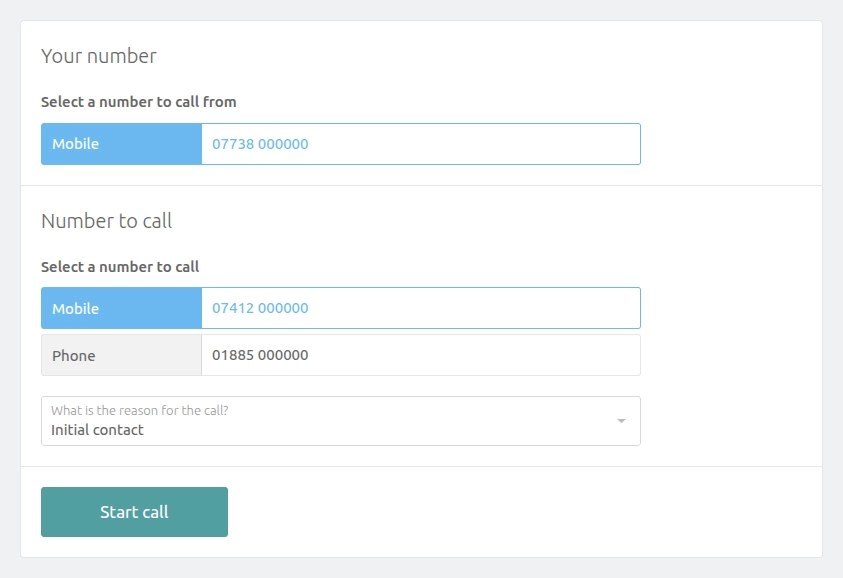
To make a call, on the next screen, select the number to call from, the number to call and the reason for the call, then select Start call.
The call flow
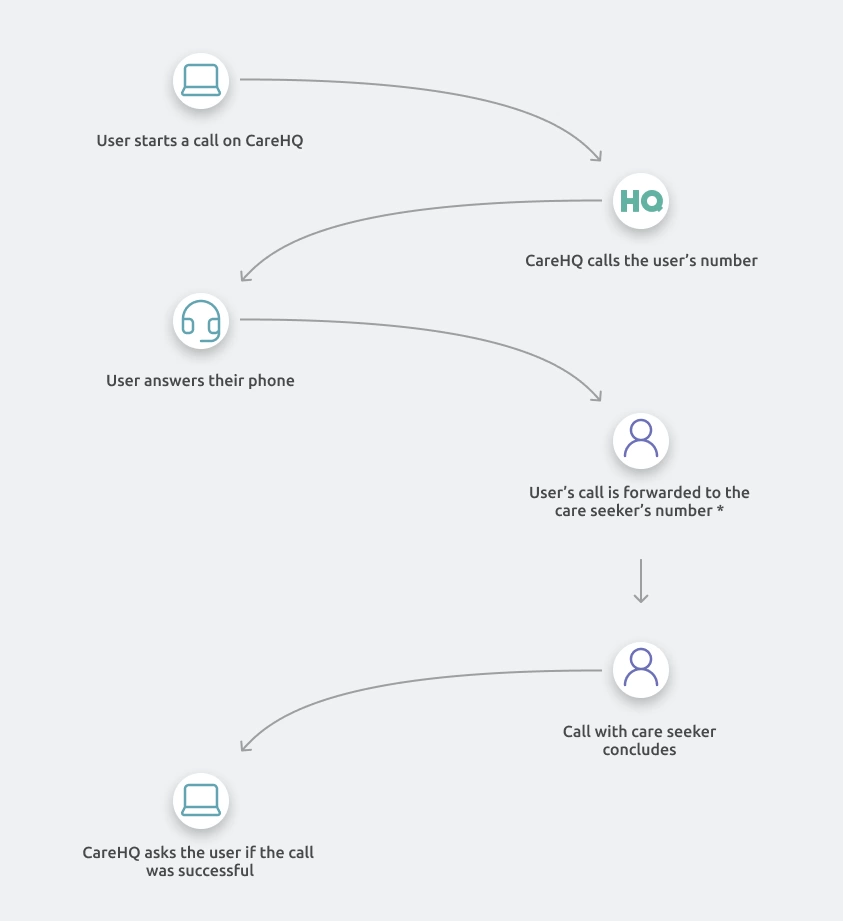
After starting the call, CareHQ will ring the number you specified to call from. When you answer the call, CareHQ will then forward your call to the care seeker's number. Once the call has concluded CareHQ will ask you if your call was successful.
What reports are available for outbound calls?
Along with the introduction of outbound tracking we've introduced two new reports to help you make use of your call data.
Call outcomes
The call outcomes report provides a breakdown of the number of outbound calls made per care enquiry by:
- Location and location group
- User making the call
- Reason for the call
The report shows the number of calls made, how many were answered and how many ended in a successful outcome.
Time to call
The time to call report focuses on the time between an enquiry being received via a non-call channel (such as email, or a directory integration) to the first outbound call being made to the care seeker.
The time it takes for a human to call a potential care seeker is a well recognised metric affecting conversion rate, with shorter time frames having a positive impact on conversion rate.
The report shows how many enquiries have been called and how many have not, as well as the mean and average time to call.
What about call recordings and AI generated summaries?
CareHQ can optionally retain recordings of outbound calls and automatically generate call summaries. Where AI summaries are enabled, calls are recorded and transcribed, and the resulting transcript is processed using OpenAI to generate the summary.
Call recording and AI summaries are optional, allowing care providers to decide whether to use these features in line with their own data protection policies and legal obligations.
The ICO's guidance emphasises that privacy information should be provided at the appropriate time and recommends the use of "just-in-time" notices, so that individuals are made aware of relevant processing when it takes place. This is particularly important for outbound calls. While a care seeker may have previously made an enquiry, they may not have specifically requested or be expecting a telephone call, and should not be expected to infer that the call will be recorded from privacy information provided at an earlier stage.
CareHQ therefore requires callers using call recording, transcription or AI summaries to tell the recipient at the start of the call that the call is being recorded and explain why.
We are aware that some services offered to care providers record / transcribe outbound calls without providing a notice at the point of recording, relying instead on information contained within a privacy policy or provided earlier in the customer journey. CareHQ does not consider this sufficient. Where a call is recorded, that fact should be brought to the recipient's attention when the recording takes place. Simply making the information available elsewhere, or at an earlier stage of the enquiry, does not meet CareHQ's requirements for use of its recording functionality.
Are there any additional costs?
The outbound call feature is included in your monthly subscription costs. However, outbound calls are charged on a per minute basis:
- Calls are 3p per minute (exc. VAT)
- Calls + recording and/or AI summaries are 5p per minute (exc. VAT)
How do we enable outbound call tracking?
If you're interested in setting up outbound call tracking on your account please contact support@crmhq.co.uk and we'll arrange a short call to run through the setup process.
It's also possible to set up call tracking for individual care homes rather than your entire portfolio.