
You can now associate care enquiries with organisations
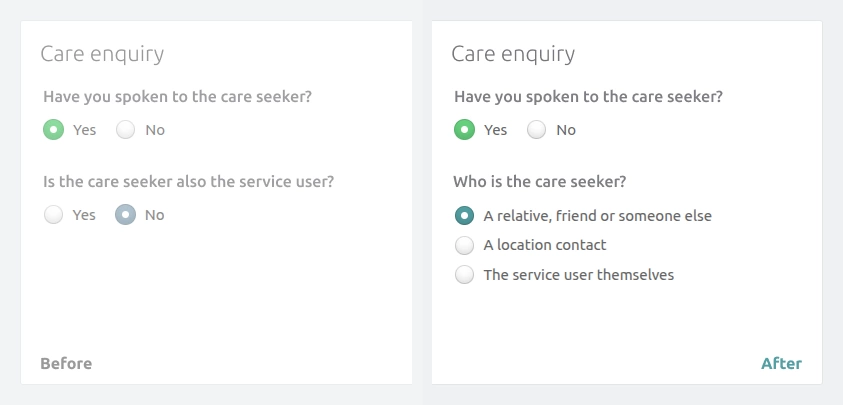
The way care seeker information is captured has changed so that professionals and organisations that refer residents can be better captured.
Previously, when adding a care enquiry, you'd initially be asked if the care seeker was also the service user (or resident). If you selected yes, the form would update and remove fields that would otherwise be duplicates or non-applicable (such as first and last name for the care seeker or the relationship to the resident).
The latest change adds support for recording that a location contact (organisation or individual within that organisation) has made the care enquiry, making it simpler and faster to associate care enquiries with contacts that frequently refer residents, such as discharge teams, social workers, doctors and care brokers.
What happens when you select a location contact as the care seeker
When you select a location contact as the care seeker, the form will remove all the care seeker fields and replace them with a single field that allows you to search for and select a location contact.
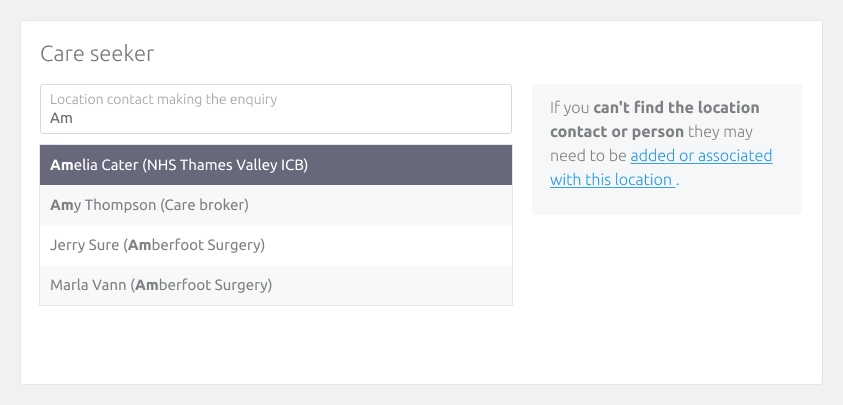
Once you select a location contact (or person associated with a location contact), you don't need to fill in any more care seeker-related fields, as that information is already held for the contact.
One thing to note is that location contacts can only be selected if they have been flagged as being able to make care enquiries. This is to ensure that the list you can search only contains relevant contacts.
If you want to know how to flag a location contact as being able to make enquiries, we have a full article on managing care enquiries from location contacts in our knowledge base.
Reporting on care enquiries from location contacts
Once you start associating your care enquiries with location contacts, you can report on which of your contacts generate the most referrals and overall admissions.
Within the Reports area, under Sales, a new report has been added called Acquisitions by location contact. The report shows you which of your location contacts are currently able to refer care enquiries, the number they have referred during the report period, as well as whether those care enquiries generated home visits, assessments and admissions.
We've also added a new Care enquiries tab when you view a location contact or person, which shows you the care enquiries associated with them.
What do you need to do?
The only change you'll notice immediately is that instead of selecting yes or no for whether the care seeker is also the service user/resident, you'll instead specify who the care seeker is from the options below:
- A relative, friend or someone else
- A location contact
- The service user themselves
Once you have flagged one or more of your location contacts as being able to make care enquiries, you'll be able to use the a location contact option.
And remember, we're here to help, so if you'd like us to jump on a call and go through anything with you, please get in touch with support by emailing us at support@crmhq.co.uk.