
CareHQ knows your business. Layers knows the market.
Introducing Layers, the first real-time market intelligence platform for care providers. Exclusive to CareHQ, Layers lets you compare your performance against the market, understand local trends and make informed decisions based on real-world market data — not just your own.
Care home profiles
Profiles show how each of your care homes is performing against the local market, including competition, planning applications, and demographic trends.
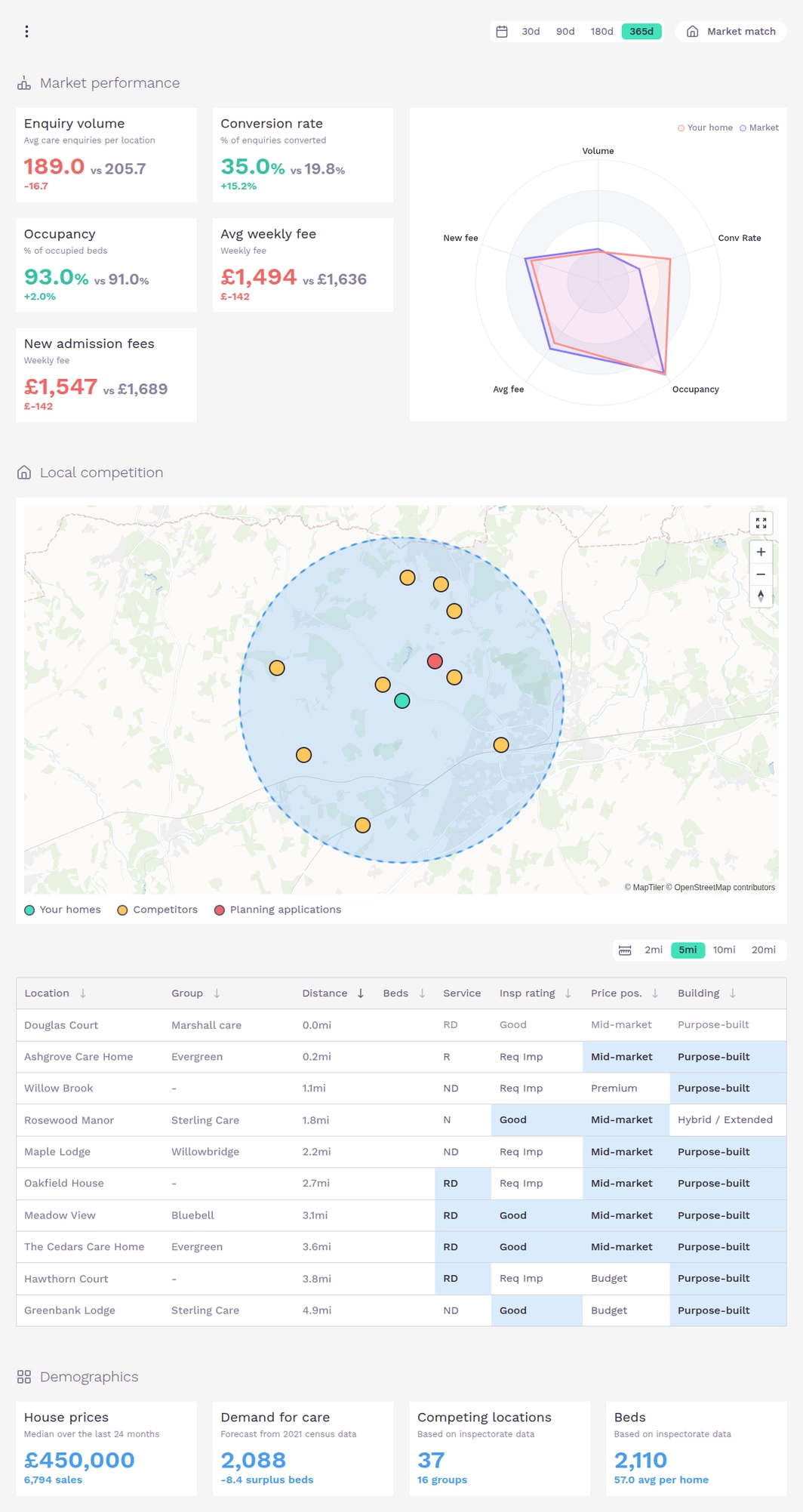
The Market match feature allows you to refine your performance comparison by matching homes with similar characteristics, including matching specific building types, price position, median house price and services offered.
Profiles can be configured to display data over 30 and 365 days and the catchment radius can be adjusted from 2 to 20 miles to provide meaningful comparisons in both urban and rural areas.
Market reports
Layers offers 48 interactive reports covering care enquiries, admissions, and demographics. Analyse enquiry volumes, conversion rates, pipelines, timings and closed reasons, alongside occupancy, movement, average weekly fees, and new admission fees. Demographic reports include care demand, planning activity, inspectorate ratings, bed density, population forecasts and more.
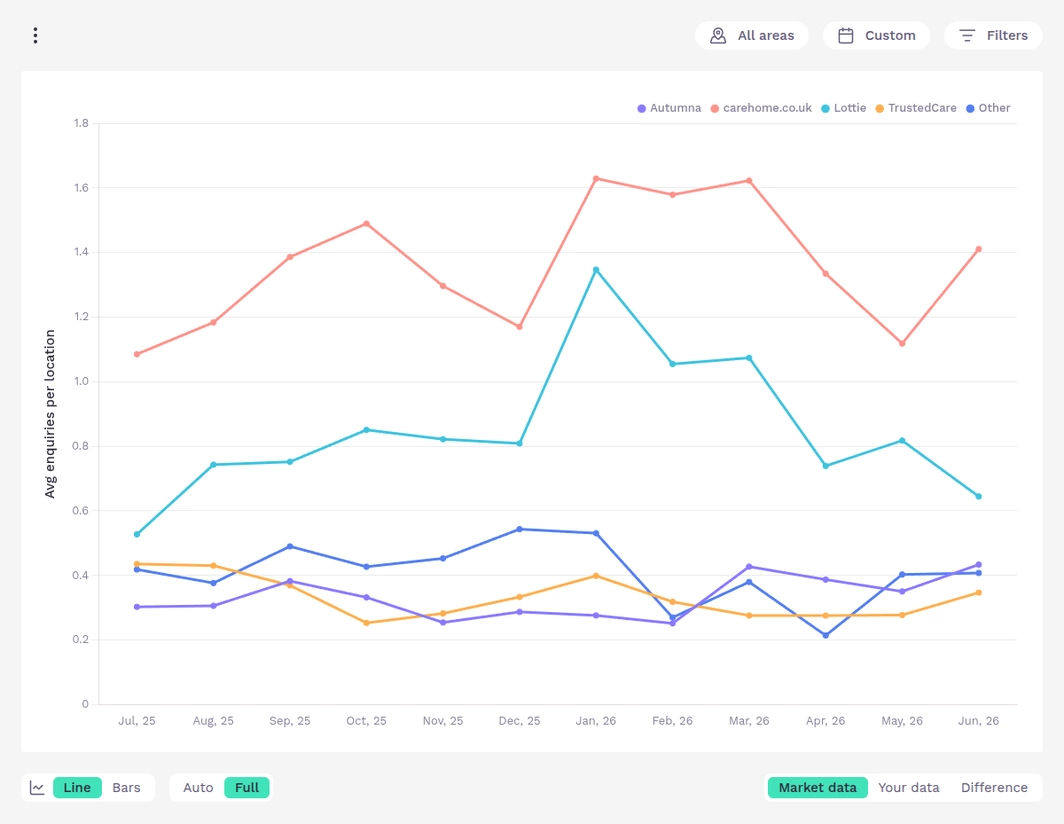
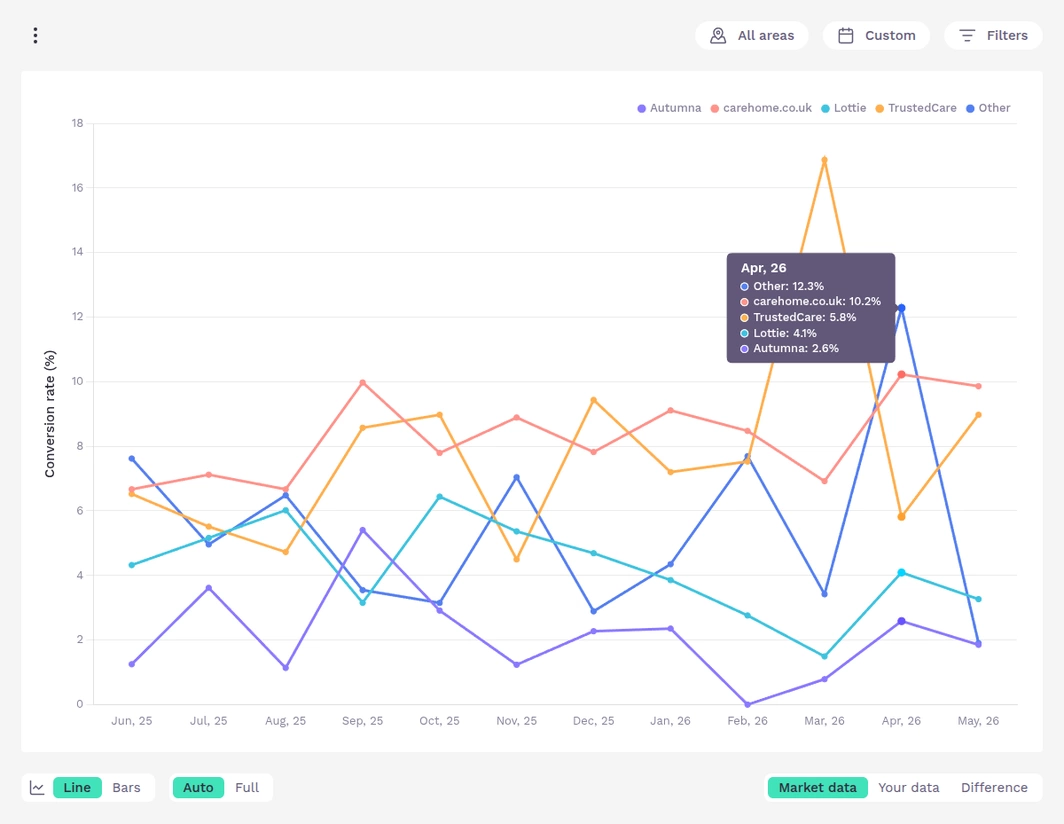
Each key metric includes multiple breakdowns to help you explore the data from different perspectives. For example, you can compare the volume of enquiries each care directory generates per home (see above) and then switch to view the corresponding conversion rate (see below).
When viewing a report, select the Your Data or Difference options to overlay your performance against the market, making it easy to identify strengths, weaknesses, and emerging trends. In the example below, which shows occupancy rates by funding type, your data is represented by the dashed lines, highlighting that this provider has a healthy proportion of privately funded residents.
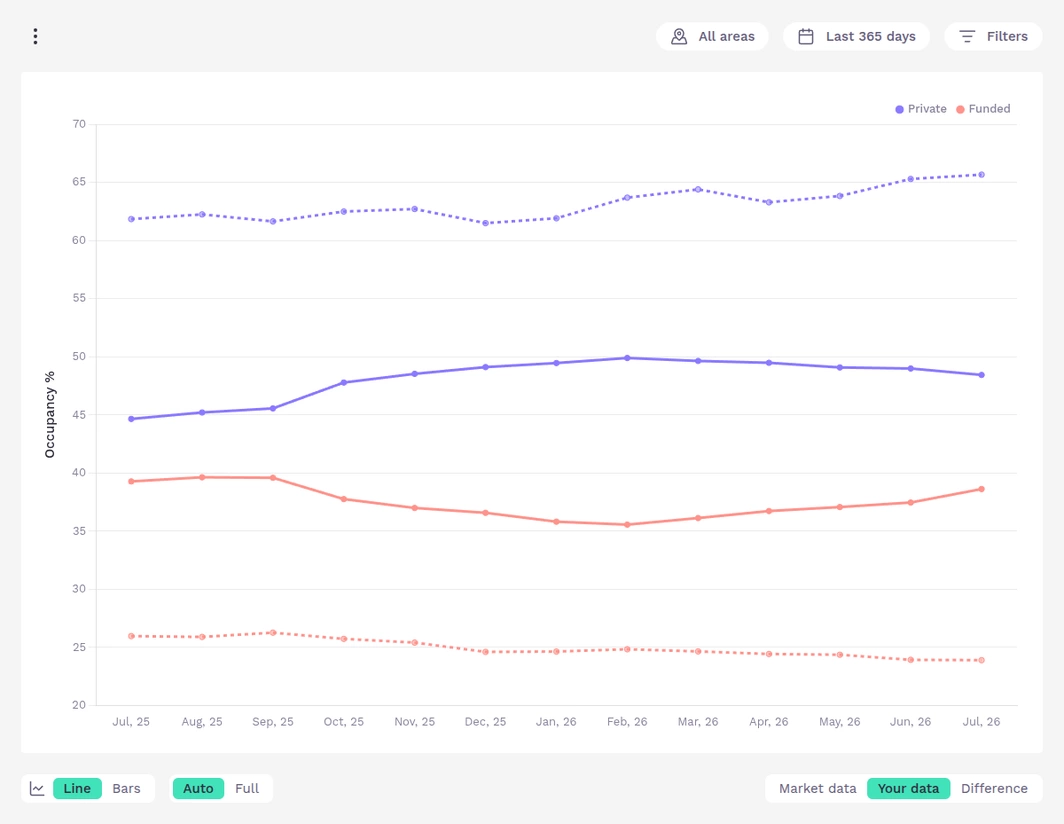
Charts can be displayed as either bar charts or line graphs and can show either the full data range or an automatically adjusted scale to make trends easier to identify.
Every report includes a supporting data table and a summary of the data used to generate the results, including the date range, geographic area, applied filters and record counts, helping you assess both the confidence that can be placed in the report and the relevance of the results.
If you want to download a report, all reports can be exported in PDF, Excel or CSV format.
Customise your report
Layers allows you to customise every report using simple but powerful filters, helping you focus on the part of the market that matters most.
Each report can be filtered by geographic region, date range and data characteristics, including type of care and funding source. Purpose-built query builders make it easy to configure each filter.
Filter by geographic area
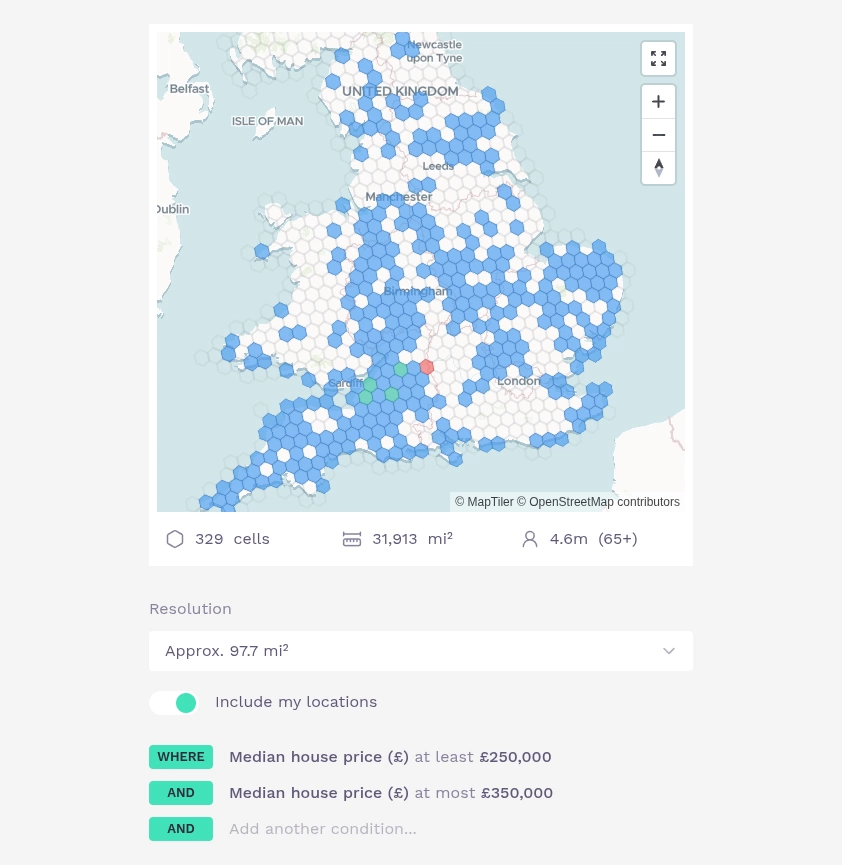
Reports can be configured to pull data from specific areas of the UK using the Area filter. A hexagon grid is overlayed on top of a map of the UK with blue hexagons representing grid cells included in the report.
The geographic query builder makes it easy to select areas based on characteristics such as median house price and administrative boundaries, including regions, counties and ICBs. Areas can be further refined by manually selecting individual cells to include (green) or exclude (red) from the analysis.
Set a date range
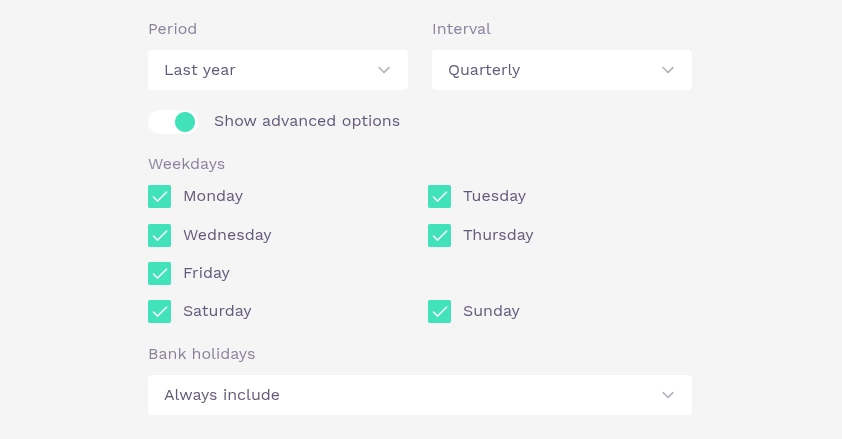
Define the date range for your reports by selecting the reporting period, interval, weekdays and bank holiday settings.
Filter by data attribute
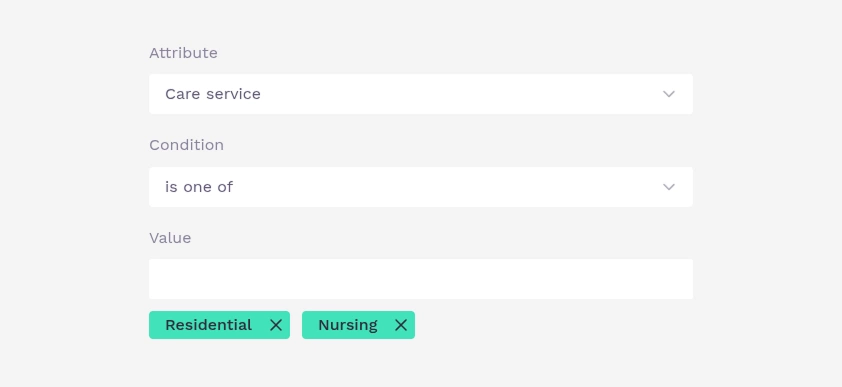
Using the data attribute query builder, you can refine report data based on attributes such as type of care, funding source, provider type and other key criteria.
Save and share your custom reports
Once you've created a custom report you can save it for future use, share it with colleagues across your organisation or add it to your dashboard.
Configure your dashboard
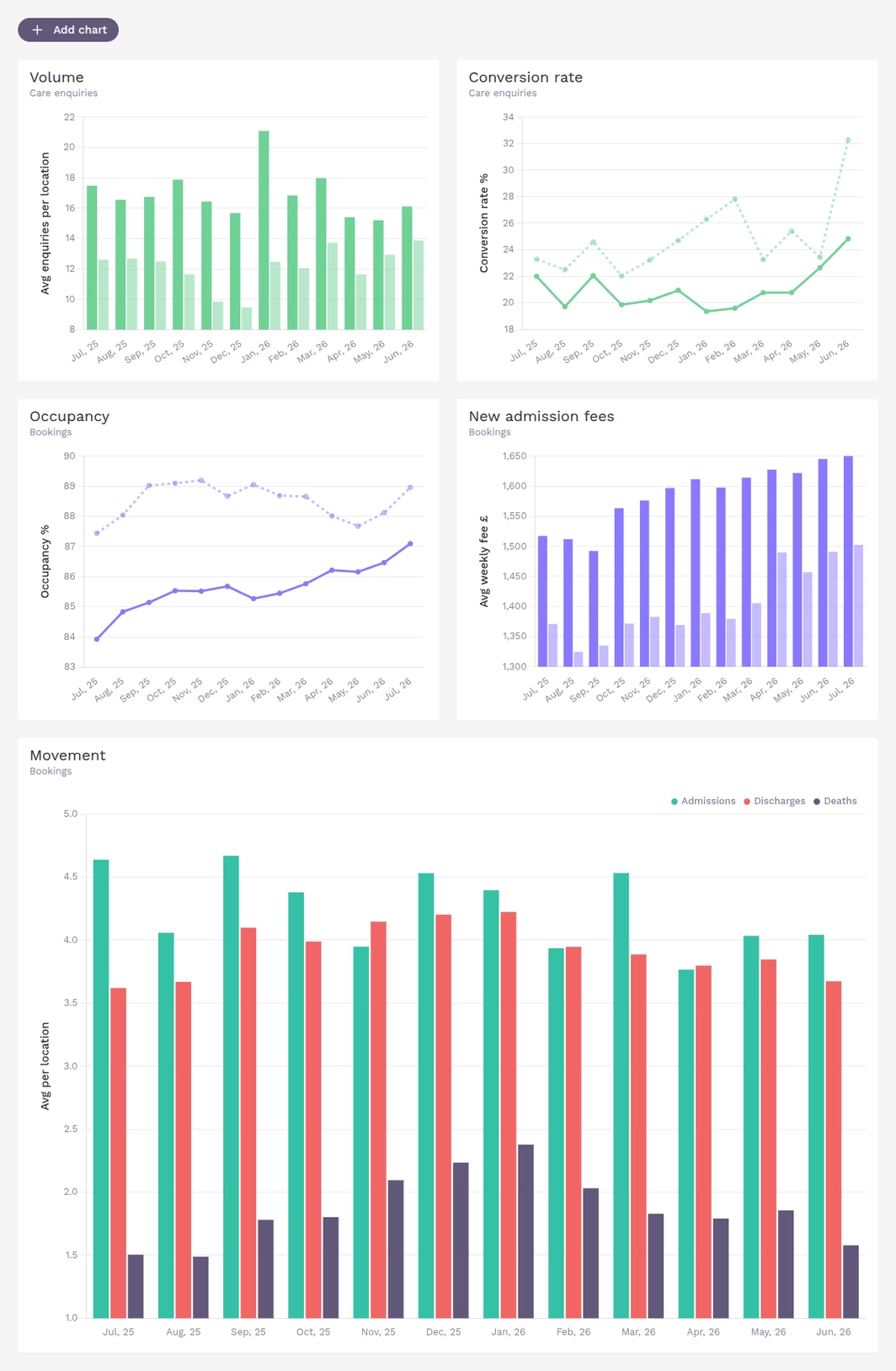
Configure your dashboard by choosing which reports to display, including saved reports. Arrange reports in your preferred order and customise their size, format, and colour to highlight the metrics most important to you.
Why do I need CareHQ to use Layers?
Layers is built on anonymised operational data contributed by CareHQ customers, including care enquiries and admissions. By restricting access to care providers that contribute data, benchmarking remains fair, representative and valuable for everyone using the platform. In short, providers that contribute to the dataset are the only ones who can benefit from the insights it provides.
Layers automatically synchronises data from CareHQ on a daily basis, ensuring data is accurate and up to date while removing the need for manual uploads or periodic data submissions.
How much does Layers cost?
Layers is available for a fixed monthly fee of £300 (inc. VAT), regardless of the number of care homes in your portfolio. There is no minimum contract term.
How do I get a tour of Layers?
We'd love to show you Layers. You can book a demo on the Layers website or contact support@crmhq.co.uk.
What if I'm not currently using CareHQ?
If you're not currently using CareHQ, the first step is to book a demonstration of the CareHQ platform. We'll show you how CareHQ can help you manage your care enquiry process, demonstrate its wider capabilities and explain how it works with Layers.
Wait! Wait! Wait! Where's the AI pitch?
Layers was built by our small development team over the last 12 months, mostly in the small hours of the morning, without relying on vibe coding or AI assistance. We wrote every line of code, and we know every line.
We don't have venture capital investors expecting rapid returns or aggressive growth targets to satisfy. We've been profitable since our first year, we don't need to sell anyone on the hype, and we definitely don't need to tell everyone we're "AI first".
AI will play a major role in the future of almost every aspect of our lives, whether through large language models or whatever comes next. When it genuinely helps our customers, we'll use it. Until then, we'll continue investing in people, not marketing.